Changelog

Aera release notes

New models, features, fixes, and improvements as they ship. Follow along on Discord or X.

v0.8.1: Skills Marketplace & Local Models

What's New in v0.8.1

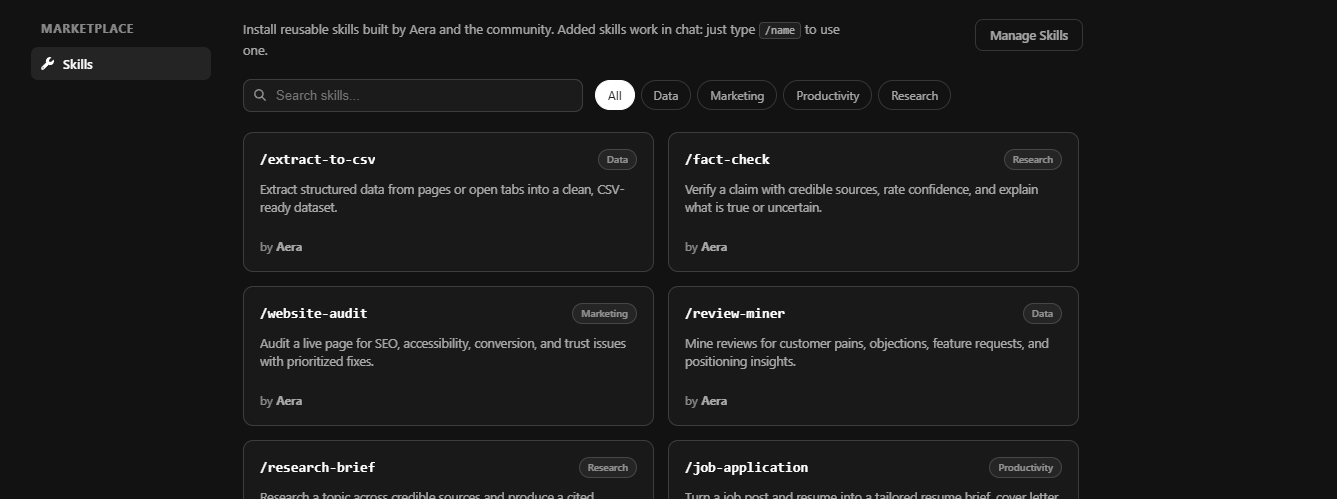
Skills Marketplace

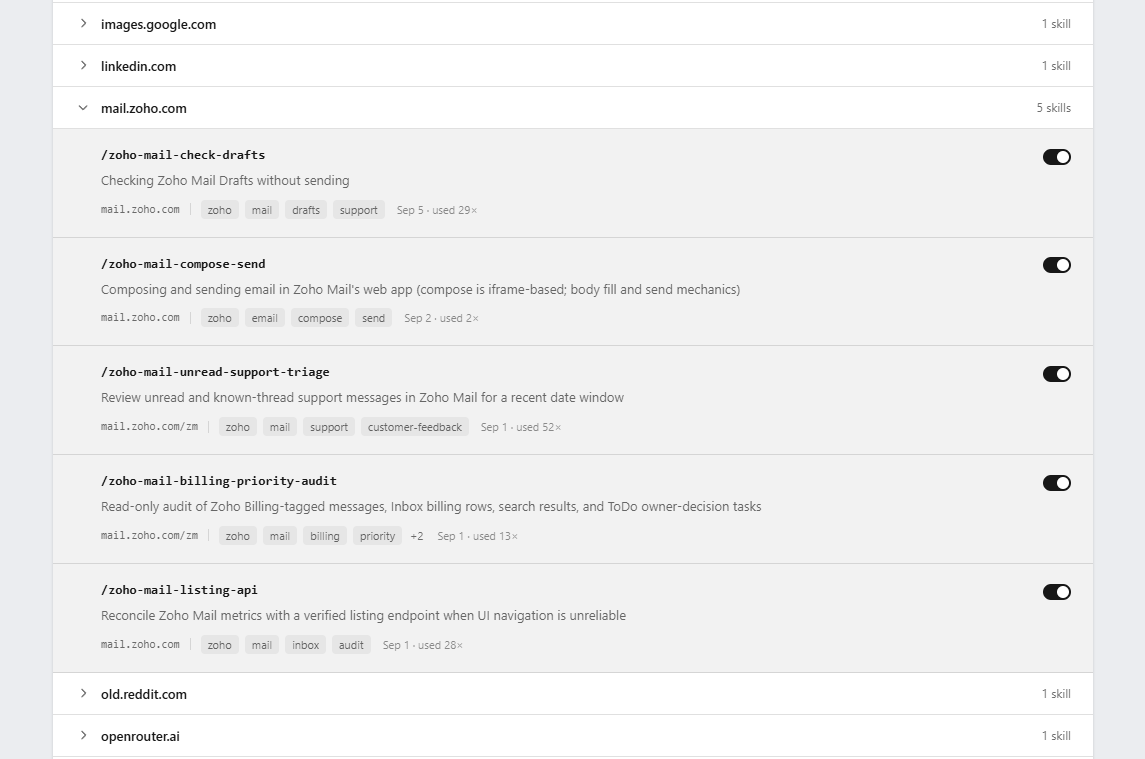
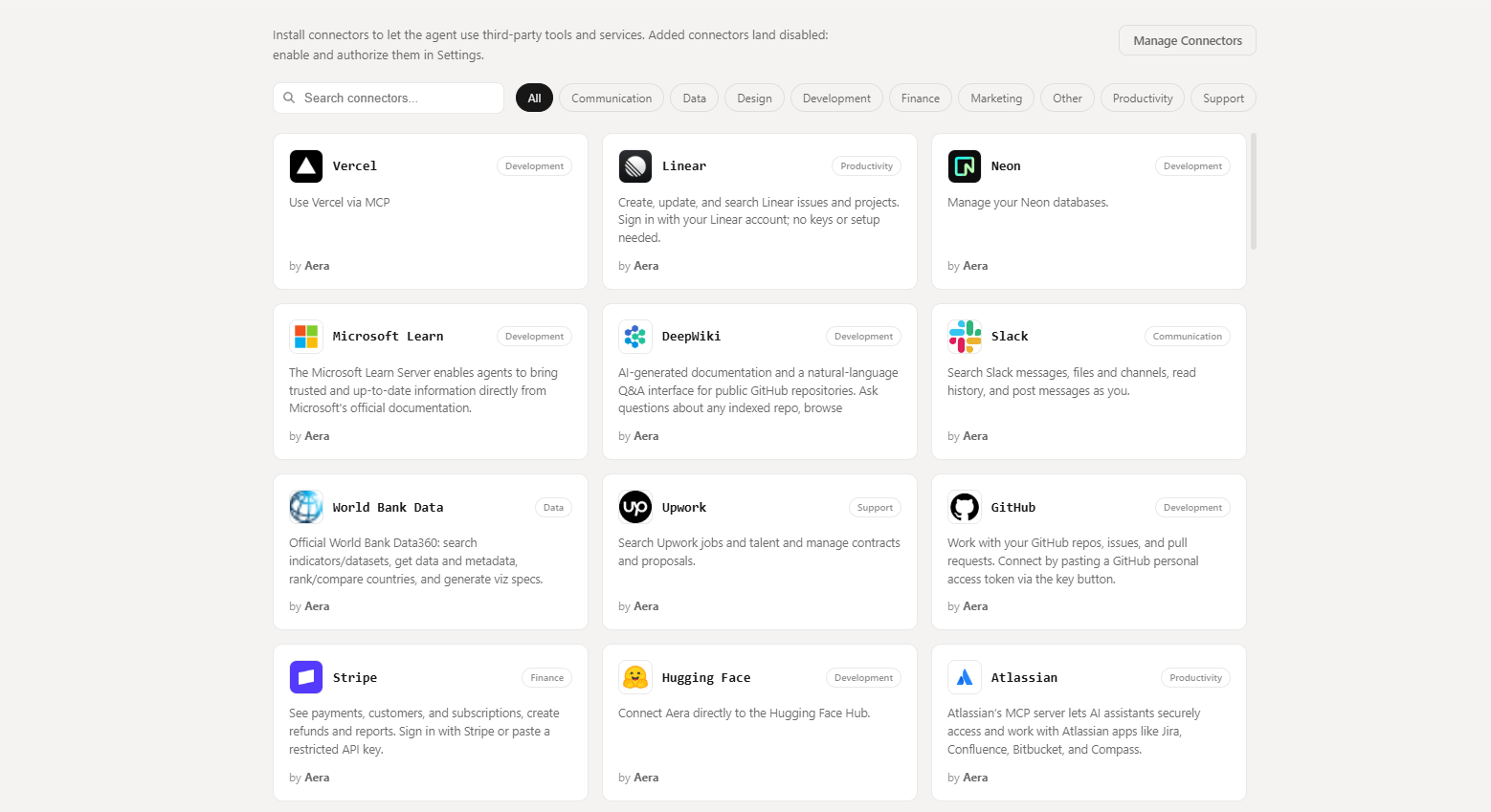
We've seen some incredible workflows within Aera, so we thought we'd make sharing them that much easier. We've introduced the Skills Marketplace, where community members can discover, create, share, and use skills from the Aera community.

Screenshot 2026-06-20 112129

You can also create and use skills locally by asking the Agent in chat or manually in Settings > Skills, where you can publish your authored skills to the marketplace, anonymously or credited.

All published skills are reviewed by the Aera team and are made publicly-available once verified.

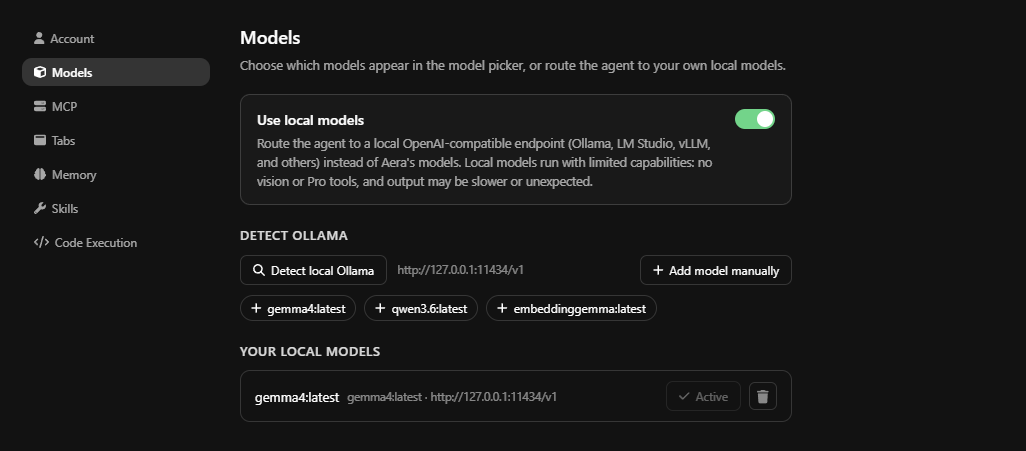
Local Model Support

We've replaced the free model router, which has historically had poor performance in agentic tasks within Aera, with local model support. Local models can be enabled from Settings > Models > Use local models, and works out-of-the-box with Ollama, detecting any currently avaible models on your device. You can manually add other local model providers if using LM Studio, vLLM, or any other provider of your choice.

Note: tools available to local models are limited as Aera relies on highly-specific vision models for certain tasks.

Screenshot 2026-06-20 111136

Bug fixes

  • Resolved issue breaking agent UI when rendering graphics.

v0.8.0 now available on Windows

Aera 0.8.0: Tasks that run on their own, a real Files library, and an agent that remembers

This is one of the biggest Aera updates yet. Your scheduled tasks now run even when Aera is closed, the agent has its own Files library it can read and write, you can point it at exactly what you mean with @-mentions, it remembers useful details across chats, and it can write and run code to handle the things a browser alone cannot. Here is everything new.

Scheduled tasks now run even when Aera is closed

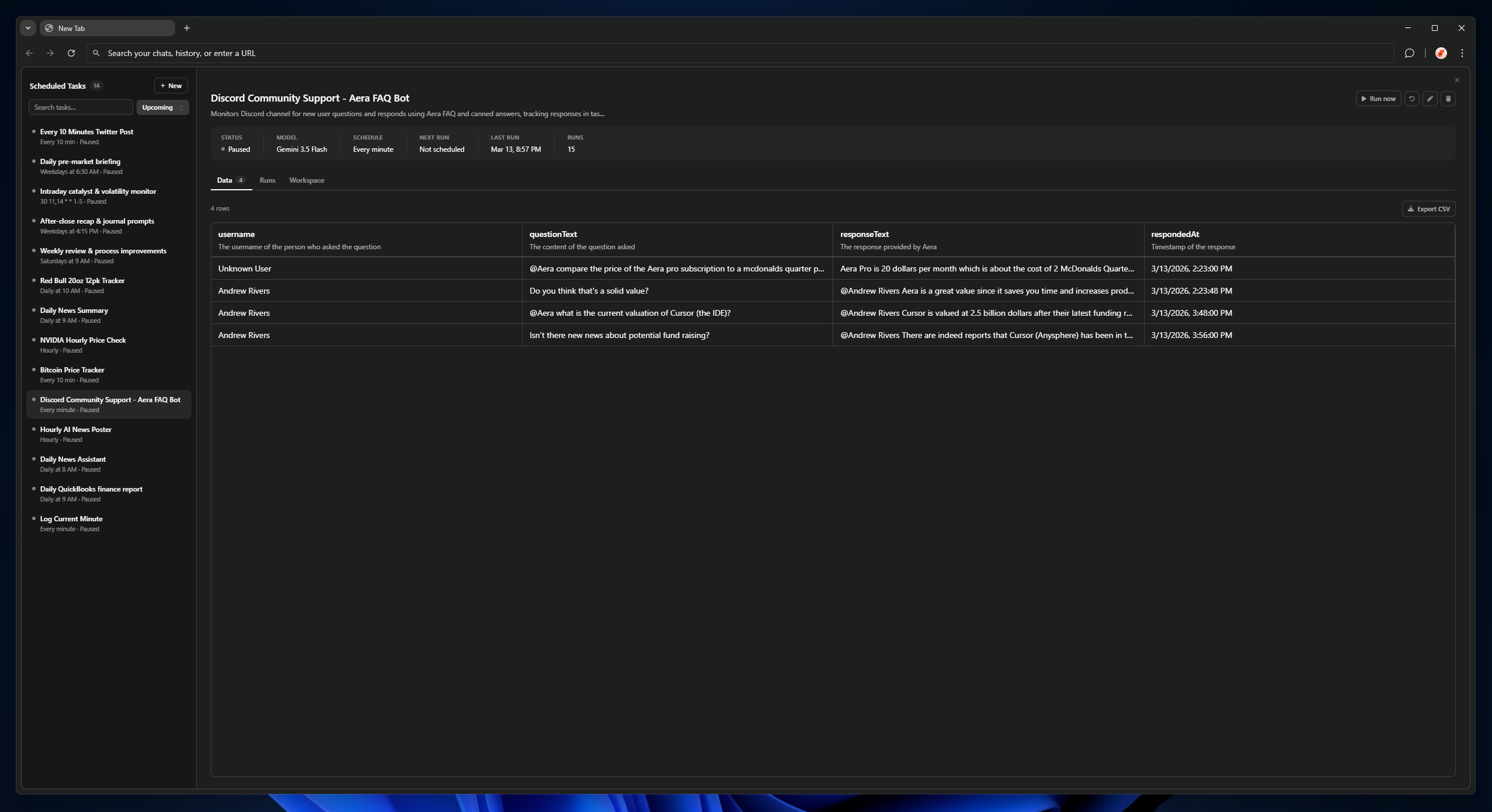
Until now, a scheduled task only fired if Aera happened to be open. That is no longer the case. A lightweight background service keeps your schedule running at all times. When a task is due, it quietly starts the browser, runs the task, and closes it again, all without interrupting you.

By default this happens silently in the background. If you would rather watch a task run, you can switch it to open in the foreground.

Where to find it: Settings > Aera Service > Scheduled Task Launch (Silent or Foreground).

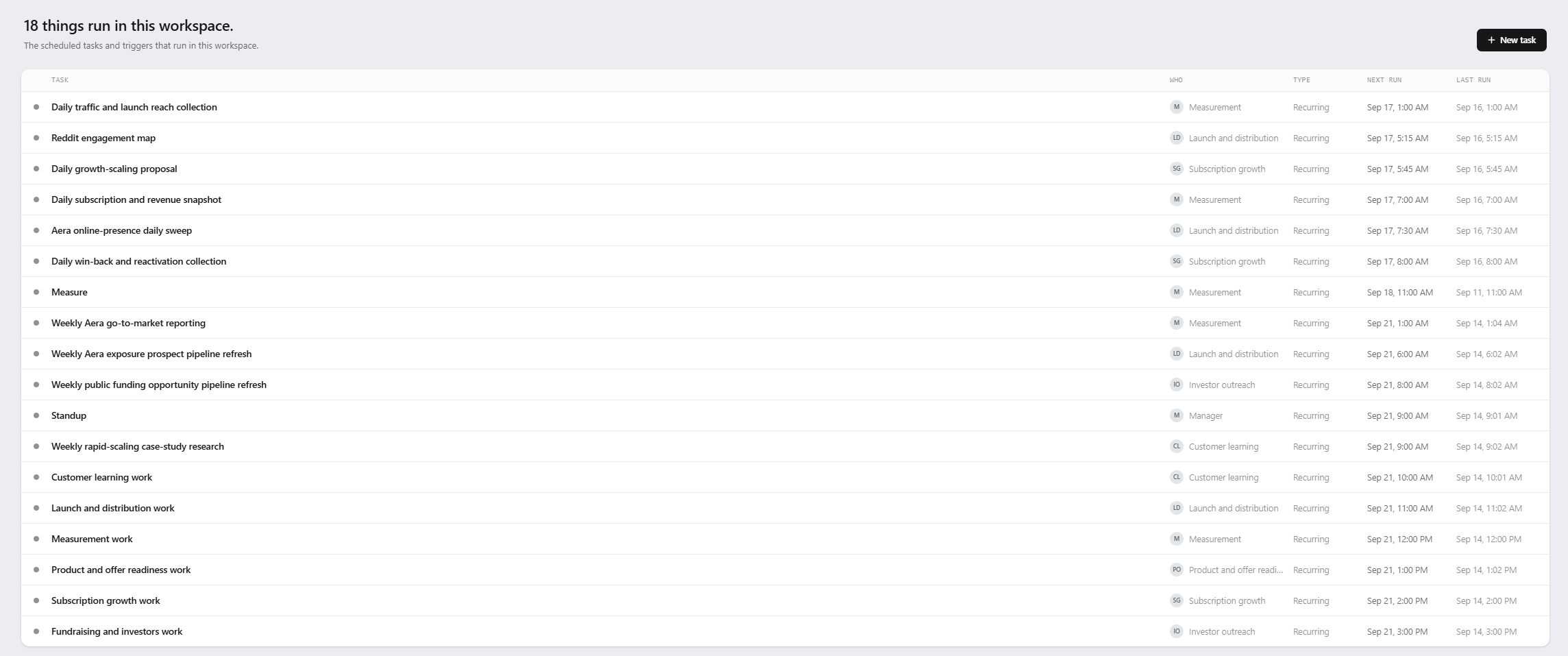
The Scheduled Tasks page has also been redesigned around a cleaner two-pane layout. Schedules now read in plain English ("Weekdays at 9 AM", "Every 15 min", "Monthly on day 15") instead of raw cron text, you get a live countdown to the next run, and every task has its own data tables and file workspace so it can build up results over time.

Screenshot 2026-06-15 194211

If you connect Aera to other tools over MCP (such as Cursor or Claude Code), those connections now persist through the same background service. Your tools can reach Aera and even wake it when they need it, without you keeping the browser open.

Where to find it: Settings > Aera Service > External MCP Access.

A Files library the agent can actually use

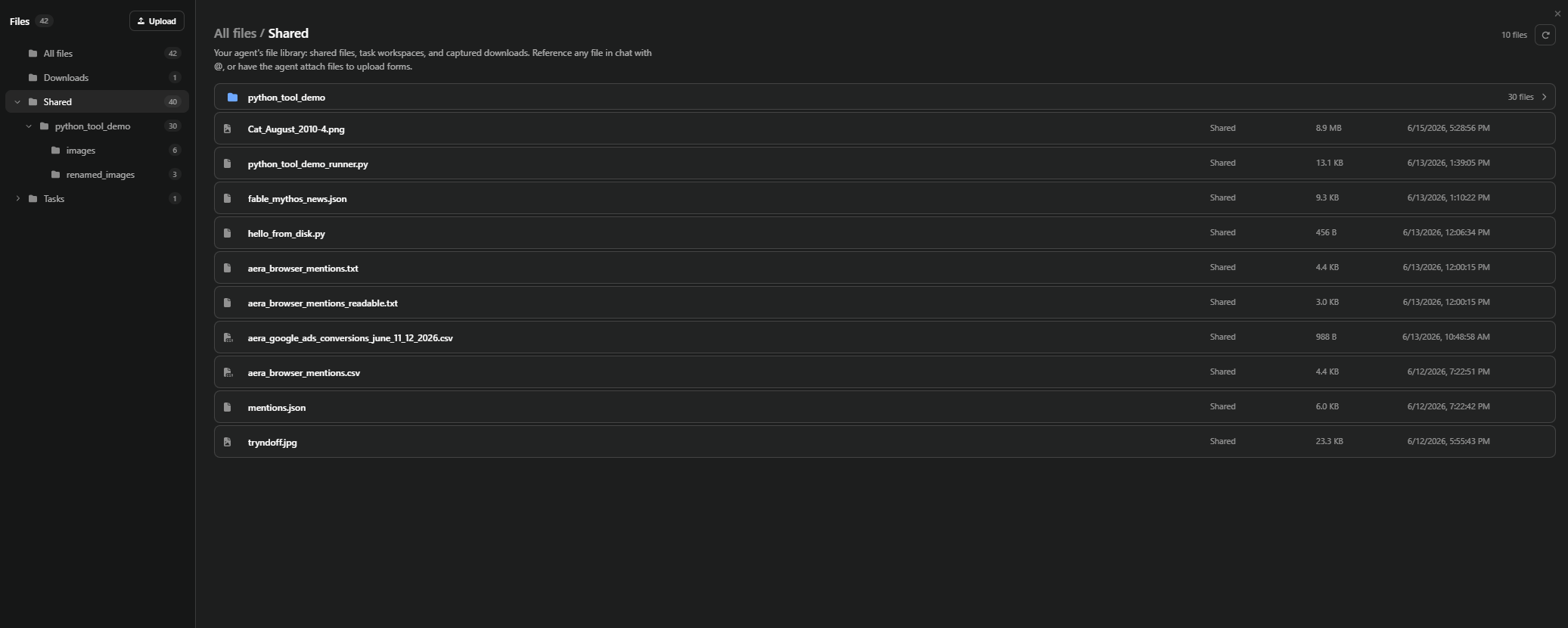
Aera now has a proper Files library. Anything the agent creates, and anything you or it downloads, is kept and organized for you.

  • The agent can save files, read them back later, and upload files straight from your library into a website. For example, it can attach a document you saved to a form or upload box for you.
  • Files you download yourself while browsing are captured into the library automatically, so they are always close at hand.
  • Each scheduled task gets its own workspace, and a file can be linked into more than one task without being copied around.

You can manage everything from the new Files page: a folder explorer on the left, your files on the right, and a full-screen viewer that previews images, PDFs, video, and audio. Text and code files open in a built-in editor with a Save button, so you can make quick edits without leaving Aera.

Where to find it: Open a New Tab and select Files.

Screenshot 2026-06-15 194417

Point Aera at exactly what you mean with @-mentions

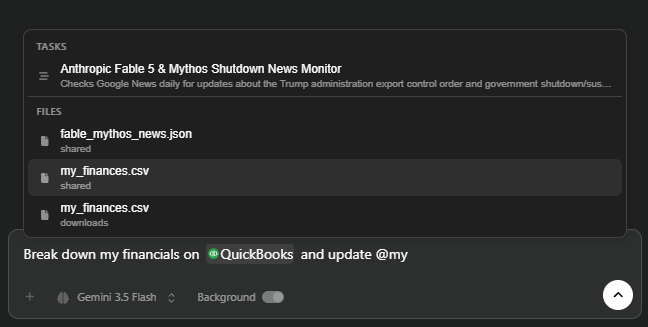
Type @ in the chat box to reference your open tabs, your scheduled tasks, and your saved files directly in a message. Mentions appear as clean chips, both as you type and in the message you send.

This makes requests far more precise. Mention an open tab to tell Aera which page you mean, mention a task to talk about it, or mention a file to bring it into the conversation. If you mention an image or a PDF, Aera looks at it directly rather than guessing from the filename.

Screenshot 2026-06-15 194957

Aera now remembers

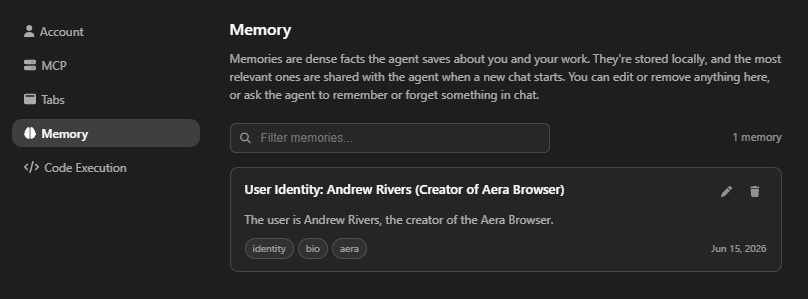
Aera can now hold on to useful details across chats so you are not repeating yourself every time. When you start a new chat, it automatically brings up anything relevant it has learned, and it can save new details as you work.

Everything it remembers is stored locally on your device, and you are fully in control. You can browse, edit, or delete any memory at any time.

Where to find it: Settings > Memory.

Screenshot 2026-06-15 195112

The agent can write and run code

Some tasks are simply better handled with a bit of code: converting and transforming files, parsing messy data, or running calculations. Aera can now write and run Python to do exactly that, and any files it produces land right back in your Files library.

This is turned off by default. You can enable it whenever you want to give the agent that capability, and for scheduled tasks you can allow it on a per-task basis.

Where to find it: Settings > Code Execution (off by default). For a scheduled task, use the Allow code execution option in the task editor.

Tab Cats!

A little something fun. Turn on Tab Cats and pixel cats will live along the bottom of the sidebar, carrying around your agent's background tab previews while it works. They are purely cosmetic and never touch your real tabs or the agent. You can choose how many appear.

Where to find it: Settings > Tabs > Tab Cats.

Screenshot 2026-06-15 195338

Smaller improvements and fixes

  • Aera can now include clickable chips in its replies that link straight to a file, tab, task, or memory it is referring to.
  • Tool calls in the sidebar are easier to follow, with clearer cards for files, code, and produced results.
  • Chat tabs no longer flicker while the agent is responding.
  • Fixed an issue that could sign you out unexpectedly when Aera started up.

v0.6.0: the Agent tab and subagents

A really big upgrade.

What's new

  • Agent Tab — manage multiple agents simultaneously and monitor the background tabs they (and their subagents) are using. Toggle between the Agent tab and the sidebar to suit your workflow, and control how tabs auto-close when agents finish.
  • Subagents — agents can now spawn subagents to work in parallel and keep the main agent's context lean. Complex multi-step tasks complete dramatically faster. Available to subscribers on named models.
  • Context summarization — on by default so long chats don't blow up the context window and burn credits. Want the full window? Toggle Ultra mode in the model dropdown.
  • Screenshots via MCP — your IDEs and CLIs can now actually see the page and make informed decisions.
  • Google login — sign in or sign up with Google, and link Google to an existing Aera account.
  • New sidebar / Agent tab UI — tool calls, thoughts, and subagents group together, separating actions from answers.
  • Profile-scoped chats, tasks, and notifications — create browser profiles whose agents only see what that profile is logged into.
  • New model — Kimi K2.5, a lightweight, cost-effective model that works well in multi-agent workflows.
  • Plus a list of bug fixes too long to print.

Notes

Initially available for Windows x64 and ARM; the macOS build followed on April 20.

v0.5.6: Aera with Vision

What's new

  • Vision — Aera can now visually understand pages and act on what it sees rather than purely programmatically. Complex web apps like Canva and Google Sheets finally work. Available on paid plans.
  • Background mode for chats — background tabs for chats and scheduled tasks now group together in the top bar; click to focus any of them.
  • Windows Defender SmartScreen resolved — installs are no longer blocked; signing is fully set up.
  • Verification subprocesses — the agent now prefers to confirm its actions actually completed instead of assuming.
  • New models — GPT 5.4 and Mercury 2 (extremely fast).

To update: download from getaera.app or Settings → About Aera → Relaunch.

v0.4.0: Aera is now free to use

What's new

  • Free version of Aera — use the sidebar for free, within limits, indefinitely, just by signing up. No payment information required. This is not a trial.
  • New frontier models — Opus 4.6, Gemini 3.1 Pro, and GPT 5.3 Codex.
  • MCP dashboard — monitor MCP activity and status, and replicate Aera's own tool calls when building your automations. Nothing is hidden behind the scenes. MCP is also significantly more stable.
  • PDF and wider document support — the sidebar can now read PDFs and many more document types.
  • Longer-running tasks — stability fixes for long sessions, including on the free tier.
  • Auto-update fixes — the update button now appears reliably, and updates apply automatically going forward.
  • New agent tools for broader functionality across more sites.

To update: download from getaera.app or go to Settings → About Aera → Relaunch.

v0.3.14: the all-new Chromium-based Aera

After a month and a half of migration work, the all-new Chromium-based Aera is available for macOS and Windows (x64 and ARM).

What's new

  • Full browser migration — bring ALL your browsing history, preferences, autofill, and more from Chrome, Edge, Firefox, or Internet Explorer with a single button.
  • Data tables for Scheduled Tasks — tasks can now store information across runs, building long-running datasets and lists from repeated executions.
  • MCP persists while the browser is off — connect your tools, close the browser, and they'll wake it when needed.
  • Claude Opus 4.6 available in the model selector.

Important

This version will not auto-update from the previous Electron version — download it directly from getaera.app and uninstall the old version first to avoid confusion.

v0.2.1: subscriptions and the password manager

The big one.

What's new

  • Subscriptions — the agent sidebar no longer requires manual OpenRouter setup or self-funded API keys. All other functionality remains completely free.
  • Secure password manager — encrypted, OS-keychain-backed password storage and autofill.
  • Model descriptions and pricing on hover, so you know the relative cost before you pick (some models, like Opus, are expensive).
  • Usage dashboard — subscribers can see billing-cycle usage on their account page.
  • Overhauled settings dropdown and a sidebar accessibility button on every page.
  • Further improved startup times.

Fixes

  • Stray permission popups and permission notification wording.

With core browser functionality mostly complete, focus now shifts to agentic features.

v0.1.15: no login required

What's new

  • Login no longer required — use Aera as a regular browser (without agentic features) with no account at all.
  • Removed the login splash screen — you land directly on the browser home page.
  • Basic Auth website support — no more Unauthorized errors on Basic Auth sites.
  • Global download and update hosting — much faster downloads outside North America.
  • Automatic update on restart once an update finishes downloading in the background.
  • Classic URL bar stability improvements and better onboarding.

Fixes

  • URL/search overlay no longer covers settings and unrelated pages.
  • Sidebar links open in a new tab instead of a new window.

(v0.1.13 and v0.1.14 were skipped due to deployment testing.)

v0.1.12: better clicking and typing, classic URL bar

What's new

  • Massively improved text input and clicking — Aera now rarely gets caught on text entry or buttons across most websites.
  • Classic URL bar layout — pick the traditional layout under Settings → Appearance → URL Bar.
  • OpenRouter credit notifications when your account balance is low (previously it just silently returned nothing).
  • Sidebar links open in a new tab, onboarding sequence for new users, and scheduled tasks ordered by next run.

Fixes

  • Sign-in pages can be dragged by their header.
  • Scheduled task cards in the sidebar are clickable.
  • The stop button now stops streaming instantly and no longer eats trailing thought messages.
  • OS notifications suppressed while Aera is focused.

Fun milestone: Aera is now #17 worldwide in Qwen 3 Coder usage on OpenRouter.

v0.1.11: Chrome Web Store, message queues, and find-in-page

Major improvements as Aera approaches its first official release.

What's new

  • Chrome Web Store support — install extensions directly from the store or import them from Chrome.
  • Expanded extension APIs (some OAuth extensions not fully functional yet).
  • Message queues — queue follow-up messages while the agent is still running.
  • Find-in-page (Ctrl + F) inside embedded browser views.
  • Mainstream browser shortcuts — the majority of standard shortcuts now work.
  • Permissions manager — per-website permission access with proper passthrough for all permission types.
  • Better tab navigation for the agent — it now moves between tabs instead of opening new ones.
  • Loading animations for tool calls, much faster tab resizing, flicker-free inline completions, visible "in-use" tabs for scheduled tasks, removed legacy page caching, and an Electron security update.

Fixes

A long list, including: correct tab switching, search focus on launch, downloads button visibility, global shortcut conflicts with other apps, OS notification titles, chat restoration opening the right chat, bidirectional scrolling for the scroll tool, network requests returning null, scheduled tasks ending correctly, and focus_tab never returning responses.

v0.1.10: Gemini 3 Pro and background chats

What's new

  • Gemini 3 Pro support, and models are now dynamically loaded — new models can be added the day they're released, without waiting for an Aera update.
  • Background chat support — chats can drive tabs in the background while you keep browsing. Tabs in use by a chat glow in the tab bar, and chats stay constrained to their own tabs.
  • Downloads management — a downloads button with live progress appears when you download files.
  • New Tab button labels option under Settings → Appearance.

Fixes

  • Fullscreen video is now truly fullscreen.
  • Search bar no longer carries the previous tab's URL into new tabs.
  • Backspace no longer re-triggers inline autocompletion.
  • List spacing in chats, Discord activities in production builds, and search overlay rendering.

Note: if you had scheduled tasks with predefined models, re-select the model in the task settings — model loading changed in this release.

v0.1.9: macOS and Linux support

What's new

  • macOS and Linux support — the two most-requested platforms, now available alongside Windows at getaera.app/download.
  • Chrome extension support (experimental) — extensions may not persist across restarts yet and need per-extension permissions for now.
  • Password reset from the login screen.
  • Faster startup and install — dramatically reduced cold-start time.
  • 9 built-in themes under Settings → Appearance, plus custom theme support.

Fixes

  • Background persistence setting for scheduled tasks.
  • Tabs close instantly without waiting for animations.
  • Custom theme image selection UX issues.

Development is now tracked on a public Trello board — and thank you to the contributors whose feedback shaped this release.

v0.1.7: hotfix for page-read hangs

A same-day hotfix for v0.1.6 resolving an issue that caused the browser to hang indefinitely after navigating to a page or attempting to read it. If you're on v0.1.6, the update button will appear automatically.

v0.1.6: Scheduled Tasks arrive

What's new

  • Scheduled Tasks — create periodic tasks from the sidebar (or manually) that run in the foreground or background while Aera is running. This is the foundation of recurring automation in Aera.
  • In-place updates are fully functional — from this version onward, updating and restarting takes under a second.
  • Localhost and local .html file support for development workflows.
  • Massively reduced startup time, with startup race conditions around settings and chats resolved.
  • Background image darkening, a Detailed New Tab layout, dark-mode scrollbars, and new global shortcuts (Ctrl + Shift + B, Ctrl + Alt + N).
  • Heavily tuned system prompt for better agent persistence on long tasks.

Fixes

  • Search overlay and tabs no longer overlap the bookmarks bar.
  • OpenRouter API key now loads reliably on startup.
  • New Tab layout handles empty states properly.

New models

  • DeepSeek v3.2 EXP

Downloads now available directly from getaera.app/download.

v0.1.5: themes, developer tools for the agent, and a new updater

What's new

  • Background images and themes — customize Aera's look entirely.
  • DOM-aware JavaScript execution tool for the agent and MCP.
  • Console viewing and execution tools for the agent and MCP.
  • Network request inspection tools for the agent and MCP.
  • MCP logs overhaul — track and replicate agent/browser communications when building your own automations.
  • Multi chat tab management and simultaneous agent runs.
  • Draggable, reorderable tabs; bookmarks open in a new tab; much faster search overlay.

Fixes

  • Window/sidebar resize no longer breaks the layout.
  • Search overlay closes properly when switching tabs.
  • Quick access links open in the focused tab.
  • Favicon race condition and OCR image-read failures resolved.

Updater note

The app moved to a new in-place updater, cutting install size from 800 MB to 292 MB. One more manual install is required before in-place updates kick in.

v0.1.4: bookmarks, history search, and notifications

What's new

  • Bookmarks with a reorderable bookmarks bar and management page.
  • Quick access section on the New Tab page.
  • History search and removal across chats and browsing history, with multiple filters.
  • OS notifications (and icon flashing) when the agent completes or needs input.
  • Smarter autocomplete — search ranking now weights sites you visit often and prioritizes sites beginning with your query.
  • Improved drag-and-drop and general UI in the sidebar.

Fixes

  • White flash on startup and on navigation to certain sites.
  • Right-click context menus for tabs and browser UI.
  • Startup sometimes requiring multiple launches.
  • Settings/bookmarks/downloads/history tabs now show proper titles and icons.
  • Sidebar no longer opens below its minimum width.

v0.1.3: context engine fixed, search engine choice, default browser

What's new

  • Preferred search engine — used for direct searches and taken into account by the agent.
  • Default browser support — Aera can be set as your system default and handle URLs opened from the OS.
  • Sidebar state persistence — open/closed state carries across sessions.
  • MCP keep-alive options — keep the MCP server running while the browser is closed, with a system-tray indicator.

Fixes

  • Context engine fully repaired — no more OCR fallback for page content, with a massive performance improvement on all agent tasks.
  • Search overlay no longer blocks clicks on underlying elements.
  • Search suggestions now populate instantly while typing.

New models

  • claude-sonnet-4.5
  • qwen3-coder (very fast)

v0.1.2: page reading restored

Pushed ahead of schedule — the failing read_page tool was a major limitation in v0.1.1.

Fixes

  • Resolved bundling issues that caused the browser to fail to read pages.
  • OCR is now the primary fallback for page content while the context engine is reworked.
  • Login sessions now persist across browser restarts.

v0.1.1: first round of fixes and GPT-5 variants

A day-one round of fixes from working directly with the early access team.

What's new

  • Navigation shortcuts — Ctrl + ← and Ctrl + → for back/forward.
  • Windows UI controls added to the title bar.
  • New models — gpt-5-high and gpt-5-low.

Fixes

  • Maximized-window sizing on Windows.
  • History and settings button placement.
  • Chat shaking while scrolling, and auto-scroll now stops when you scroll up.
  • Models migrated to unique IDs.
  • Reduced circular chain-of-thought loops in thinking-model configurations.

Aera v0.1.0: the first alpha

The first alpha build of Aera Browser is here.

This release is an early testing build for Windows. The agentic sidebar runs bring-your-own-key via OpenRouter; MCP usage is entirely free and requires no key.

What it can do

Aera can autonomously surf the web, perform actions, conduct in-depth research, create job listings, investigate social media account performance, break down personal finances, send emails, add events to your calendar, create charts, and more. Sidebar and MCP functionality are virtually identical — anything the sidebar can do, your own programs can do through MCP. The MCP logs tab lets you follow along with the agent's tool calls to model your own automations.

Aera also works as a fully standalone browser. Local sessions persist, so once you log into a site, the agent can use that context to act on your behalf.

MCP setup

Enable the MCP server from the server icon on any new tab, then point any MCP-compatible tool at it:

{
  "mcpServers": {
    "aera-browser": {
      "url": "http://localhost:3001/mcp"
    }
  }
}

Useful shortcuts

  • Ctrl + M — toggle sidebar
  • Ctrl + K — search / URL bar
  • Ctrl + N — new tab
  • Ctrl + Shift + T — MCP logs
  • Ctrl + Shift + I — dev tools

Known limitations

Complex web apps and some PWAs (e.g. composing social media posts) are weak spots in this build, some banking sites block non-mainstream browsers, and continuing very old chats can occasionally error the agent. Keys, chats, and browsing history are stored entirely locally and never touch Aera's servers.